
Automated screening has become very good at raising the flag. A figure is questioned for suspected AI generation, manipulation, image plagiarism, self-plagiarism, or any other check, and the reviewer knows where to look. But a flag is where the work begins, not where it ends.
The next step usually means asking the author for source material: the original files behind the figure. It is a routine request, and often a de-escalating one, since most flagged images turn out to be error rather than misconduct. But that is where many reviews stall. The image alone rarely tells the whole story, and some of the strongest evidence hides where few ever look: inside the source files themselves, in data that most reviewers have never had a practical way to read.
This summer we previewed a tool for exactly this moment with a select group of journal editors, research-integrity officers, and investigators. Today it becomes part of the platform. The Source Inspector is a tool inside Proofig AI and Octym that reads the metadata, Content Credentials, and AI-use signals embedded in original image files, bringing image metadata analysis for research integrity into the same place you already review figures.
Image Metadata Analysis, Inside the Platform
The Source Inspector is a standalone tool inside Proofig AI and Octym. It does not change how automated screening works, and it is not a step in the review workflow. It is something to reach for whenever you have image files in hand and need to know what they carry.
Its home use case is the moment after a flag: a figure is questioned, you request the author’s source files, and you run those originals through the Inspector. But it works just as well any time you need to look inside an image, or a whole group of images, whether or not anything was flagged.
Upload a single file or an entire set. The Inspector reads what is embedded in each one, explains its findings in plain language, and produces a downloadable report you can attach to a case file.
What’s Embedded Inside a File
Every image file carries far more than its pixels. The Source Inspector surfaces three layers of it:
- Full metadata. The instrument or camera, the software that created or saved the file, capture and modification timestamps, GPS where present, and edit history when the editing tool recorded it.
- Content Credentials (C2PA). The cryptographically signed, tamper-evident record of how an image was made: the creating tool, the recorded edit steps, and whether the signature still holds. Credentials are still rare in scientific imaging and most common on files from AI generators and recent creative tools, which is often exactly the signal a reviewer is looking for.
- AI-use signals. Markers that AI tools leave in metadata, and, when the generator left one behind, the actual generation prompt. Pixel-level detection returns a probability; embedded markers leave a document trail, which is why a high detection score is a reason to ask for the original acquisition files.
This is information most reviewers never get to see. The Source Inspector puts it one upload away.
Pattern Analysis Across the Whole Set
Reading one file is useful. Reading a whole set together is where the Source Inspector goes further.
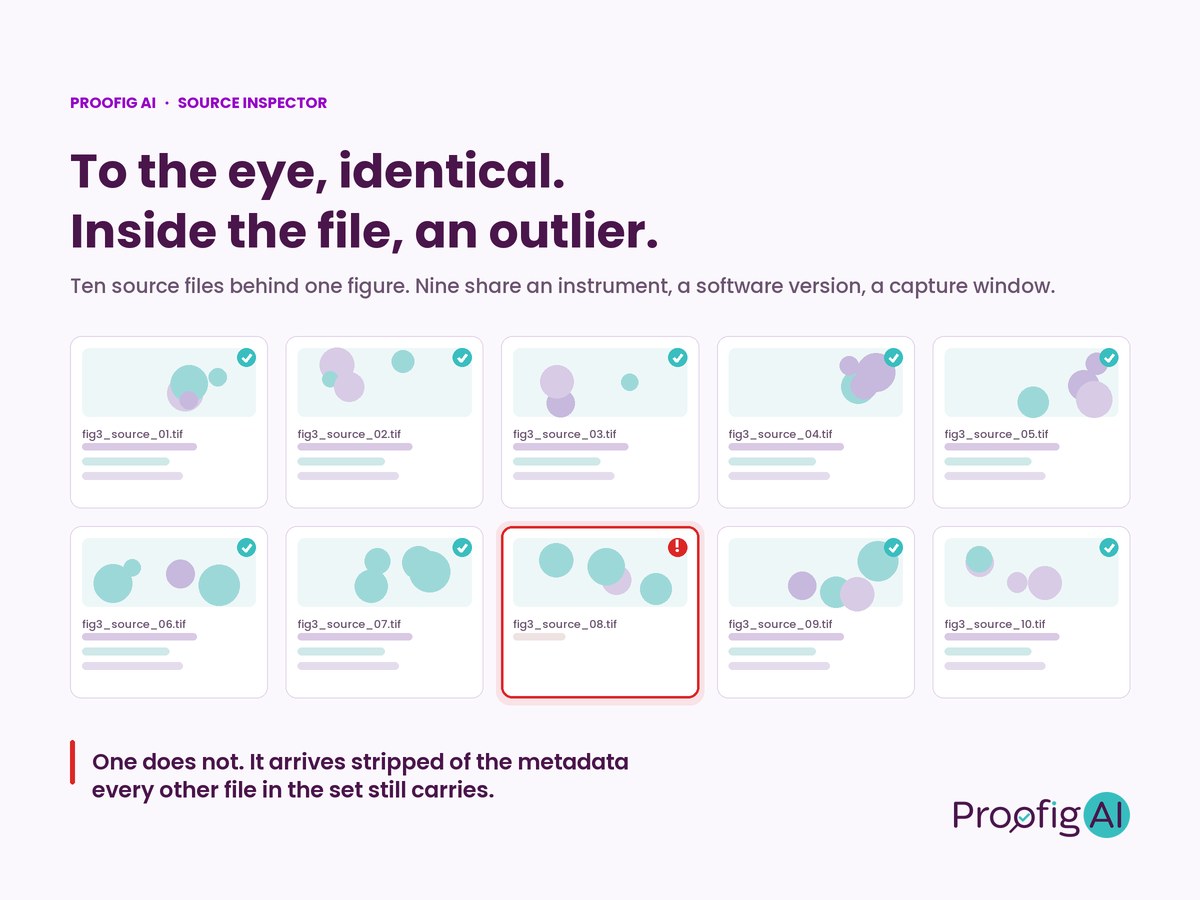
Upload every source file behind a figure and the Inspector maps what is typical for the set, then surfaces the file that does not fit. A capture date that does not match the others. A different instrument. Metadata missing from one file when every other file has it.
This matters because when something is wrong with an image, it often shows on the inside even when it looks just like the rest. Nine micrographs from the same microscope and one from somewhere else can be indistinguishable on screen. To the eye, identical. Inside the file, an outlier. And the finding is most telling when the outlier turns out to be the very figure that was questioned in the first place.
A Lead Is Not a Verdict
As with every signal on the platform, an inconsistency is not proof. Metadata can be edited or stripped, so the Source Inspector’s findings are investigative leads, not verdicts. A clean read never certifies an image, and the absence of AI markers never rules AI out.
That is precisely why source files, rather than the submitted figure, are the right thing to inspect. Credentials and metadata rarely survive a screenshot or a re-save. Original files are where they persist, and a file that arrives stripped bare while its siblings carry full metadata is itself worth a question to the author. The Inspector tells you where to look next. The decision remains yours.
Built for Everyone Who Reviews
- Publishers and editors can turn a source-file request into documented findings, with a report ready for the case file.
- Institutions, research-integrity officers, and ethics committees can compare a lab’s original files as a set, and see which one breaks the pattern.
- Researchers can check what their own source files carry before submission, and know their originals will stand up to scrutiny.
Private by Design
The Source Inspector runs under the same protections as everything else on the platform. All analyses run on private, secure servers. Your manuscripts and images are never used to train our models, and your reports remain fully confidential. Proofig AI has completed a SOC 2 examination of its security controls.
The Direction of Image Integrity
Detection finds the question. The Review Assistant helped reviewers understand it. The Source Inspector helps answer it, with what the files themselves record. Together they move image integrity from detection to decision to documentation, so that a flag becomes a documented finding, and a reviewer’s judgment rests on evidence rather than impression.
Try It in Your Next Review
The Source Inspector is available now in Proofig AI and in Octym. Log in to try it, or request a demo to see it in action.